
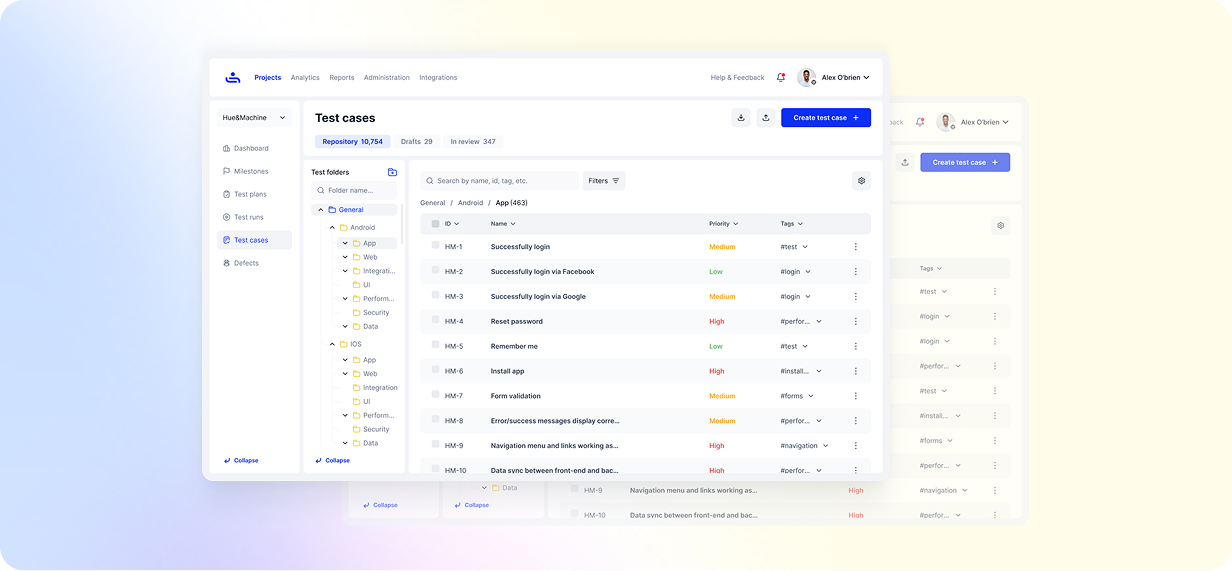
Every great software release starts with great testing, and that begins with well-written test cases. Clear, structured test cases help QA teams validate functionality, catch bugs early, and keep the entire testing process focused and reliable. But writing great test cases takes more than just listing steps; it’s about creating documentation that’s easy to understand, consistent, and aligned with your testing goals. This guide will walk you through the exact steps to write a test case, with practical examples and proven techniques used by QA professionals to improve test coverage and overall software quality.
What Is a Test Case in Software Testing?
A test case is a documented set of conditions, steps, inputs, and expected results used to check that a specific feature or function in a software application works as it should.
In software testing, test cases form the backbone of every QA process. They help teams ensure complete coverage of each feature, stay organized, and maintain consistency across different releases. Without structured test cases, it becomes easy to miss defects or waste time retesting the same functionality.
In agile environments, where products evolve quickly and new builds roll out frequently, having clear and reusable test cases is a way to assess quality quickly before release. Test cases management allows software testers to validate updates with proven confidence and help QA teams maintain stability even as new features are introduced.
There are two ways you can create and conduct test cases:
Manual Test Cases
Manual test cases are created and executed by testers who manually follow each step and record the results. Manual testing is ideal for exploratory scenarios, usability assessments, and cases that rely on human judgment.
Automated Test Cases
Automated test cases are created using automation frameworks that automatically execute predefined test steps without needing manual input. Automation speeds up repetitive and regression testing, providing faster feedback and greater consistency. In most modern QA teams, both manual and automated test cases work together, balancing accuracy with efficiency to create high-quality, reliable products.
Why Writing Good Test Cases Matters
Writing good test cases comes down to clarity. When a test case is easy to read, anyone on the QA team can pick it up and know exactly what to do. It removes the confusion, keeps things consistent, and makes sure no key scenario gets missed.
Clear documentation also saves time in the long run. Teams can find bugs earlier, avoid repeating the same work, and stay focused on making sure the product works the way it should.
But when test cases are unclear, the whole process slows down. People interpret steps differently, things get missed, and problems show up later in production when they’re far more expensive to fix.
Essential Components of a Test Case
A well-structured test case includes several key elements that make it easy to understand, execute, and track. These components include:
Test Case ID: Each test case should have a unique identifier. This will help the QA team to organize, reference, and track test cases, especially when dealing with large test suites.
Test Title: A good test title is short, descriptive, and makes it easy to see what the test is designed to verify.
Test Description: The description highlights the main goal of the test case. It explains which part of the software is being checked and gives a quick understanding of what the test aims to achieve.
Preconditions: Preconditions are conditions that must be met before the test can be executed. This may include setup steps, user permissions, or system states that ensure accurate results.
Test Steps: Test steps are a clear, step-by-step list of actions that testers need to follow to execute the test. Each step should be logical, sequential, and easy to understand to prevent confusion.
Expected Result: The expected result defines what should occur once the test steps are followed. It helps testers verify that the feature performs the way it’s meant to.
Actual Result: Actual result is the real outcome observed after running a test. Testers compare this with the expected result to determine if the test passes or fails.
Priority & Severity: Priority indicates how urgently a defect needs to be fixed, while severity describes how much the defect affects the system’s functionality.
Environment / Data: The environment and data used to run the test keep the results consistent and repeatable every time the test is executed.
Status (Pass/Fail): Reflects the outcome of the test. A Pass confirms that the feature worked as expected, while a Fail highlights an error that requires attention.
How to Write a Test Case (Step-by-Step Process)
The goal of a test case is to provide a straightforward, reliable guide that anyone from the QA team can use. Here’s a simple, structured process to help you write effective test cases that improve software quality and testing efficiency.
1. Review the Test Requirements
Every strong test case starts with a clear understanding of what needs to be tested. Begin by thoroughly reviewing the project requirements and user stories to understand the expected functionality. Identify the main goals, expected behavior, and any acceptance criteria that define success for that feature.
At this stage, it’s important to think beyond what’s written. Consider how real users might interact with the feature and what could go wrong. Ask questions, clarify uncertainties, and make notes of possible edge cases, which are unusual or extreme scenarios, like entering very large numbers, leaving required fields blank, losing internet mid-action, or clicking a button multiple times, that help testers catch issues beyond the normal flow.
The better you understand the requirement, the easier it becomes to create focused, meaningful test cases that actually validate the right functionality.
2. Identify the Test Scenarios
After reviewing the requirements, the next step is to outline the main scenarios that describe how the user will interact with the feature. A test scenario gives a bird’s eye view of what needs to be tested; it’s the story behind your test cases.
Think of a test scenario as a specific situation you need to test to make sure a feature works properly. For example, if you’re testing a login page, one scenario could be a user logging in successfully with the correct credentials. Another could be a user entering the wrong password, or trying to log in with an account that’s been deactivated.
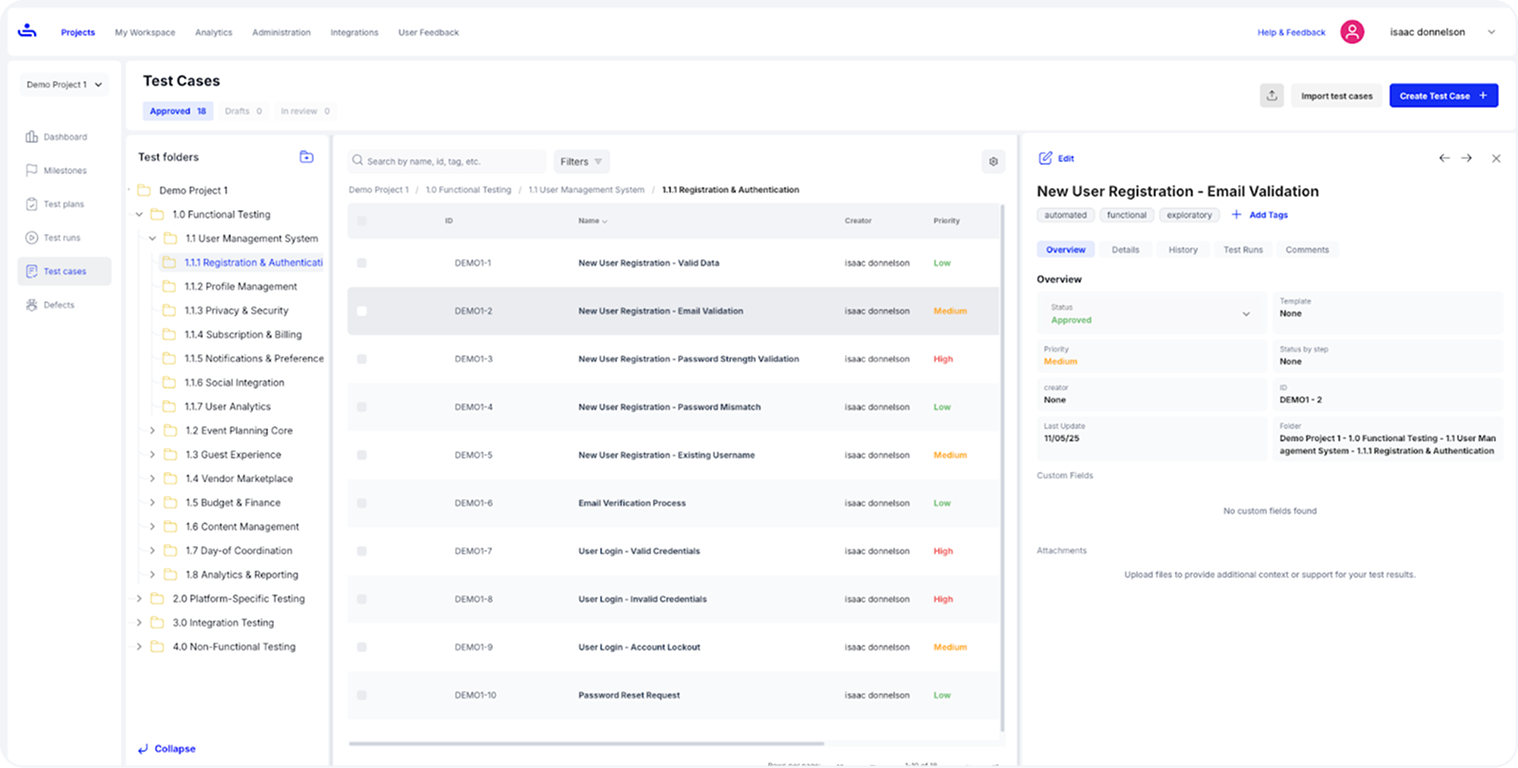
The image above shows how test cases are organized inside a project in TestFiesta, with folders on the left, a detailed list of cases in the center, and the selected test case opened on the right for quick review and editing.
3. Break Each Scenario into Smaller Test Cases
Once you’ve defined your main test scenarios, the next step is to break each one into smaller, focused test cases. Each test case should cover a specific condition, input, or variation of that scenario. Breaking test scenarios into cases confirms that you’re not just testing the “happy path,” but also checking how the system behaves in less common or error-prone situations.
4. Define Clear Preconditions and Test Data
Before you start testing, make sure everything needed for execution is properly set up. List any required conditions, configurations, or data that must be in place so the test runs smoothly. This preparation avoids unnecessary errors and keeps the results consistent. Documenting preconditions and test data also makes it easier to rerun tests in different environments without losing accuracy.
5. Write Detailed Test Steps and Expected Outcomes
After setting up your test environment, list the actions a tester should take to complete the test, step by step. Each step should be short, specific, and written in the exact order it needs to be performed. This makes your test case easy to follow, and anyone on the team can execute it correctly, even without a lot of prior context. Next, define the expected result, either for each step or as a single final outcome, depending on how your team structures test cases. This shows what should happen if the feature is working properly and serves as a clear reference when comparing actual outcomes.
6. Review Test Cases with Peers or QA Leads
Before finalizing your test cases, have them reviewed by another QA engineer or team lead. A second pair of eyes can catch missing steps, unclear instructions, or redundant cases that you might have overlooked. It’s important to maintain consistency across the QA team with regard to standards and the structure of a test, and peer-reviewing is a great way to do that. It gives you broader test coverage and a more unified approach among team members.
7. Maintain and Update Test Cases Regularly
Test cases aren’t meant to be written once and forgotten. As software evolves with new features, design updates, or bug fixes, your test cases need to evolve too. Regularly review and update your test documentation to keep it relevant and aligned with the latest product versions.
Test Case Writing Example
To bring everything together, here’s a practical test case example that shows how to document each element clearly and effectively.
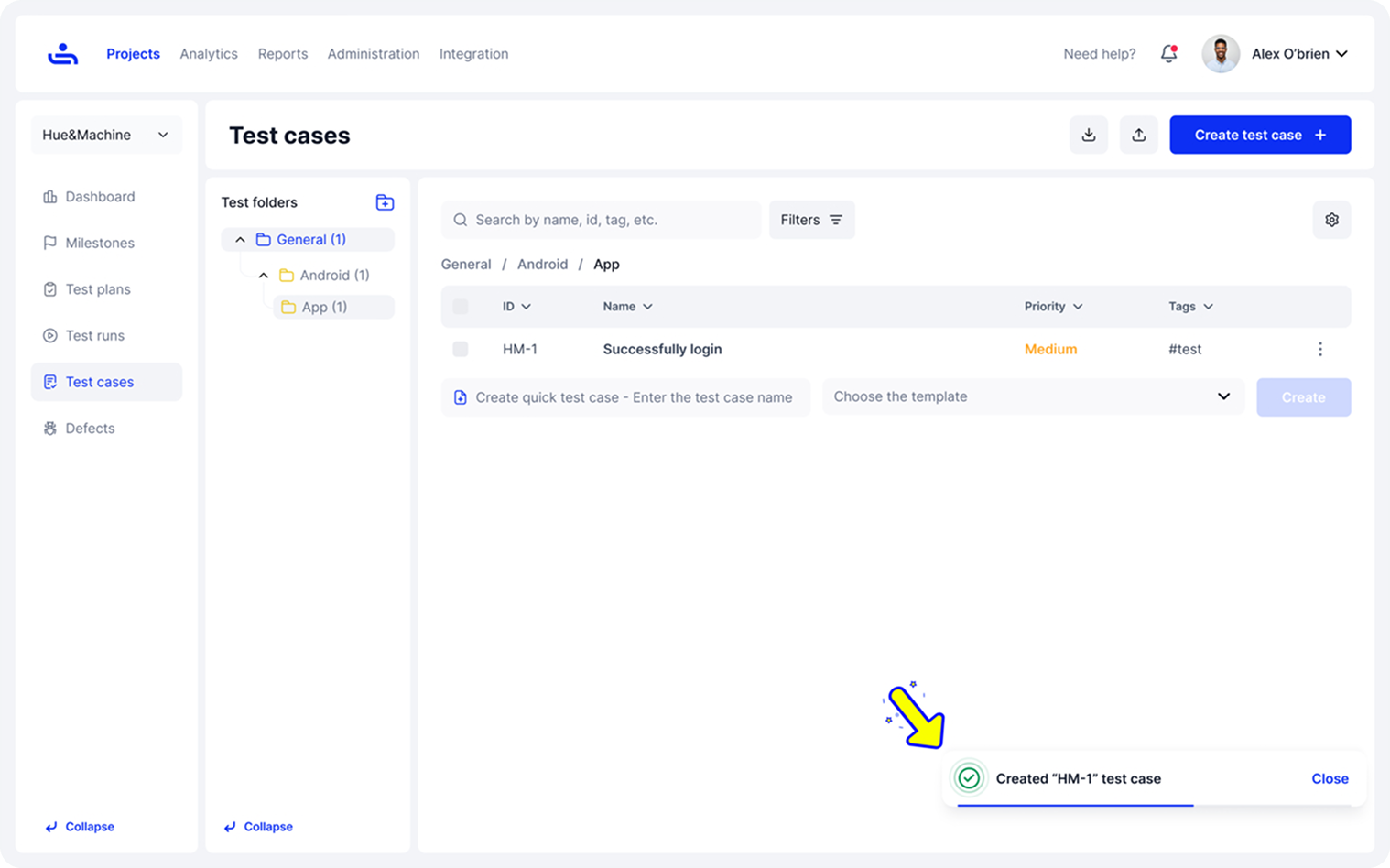
The screenshots below walk through a quick example of creating a new test case.
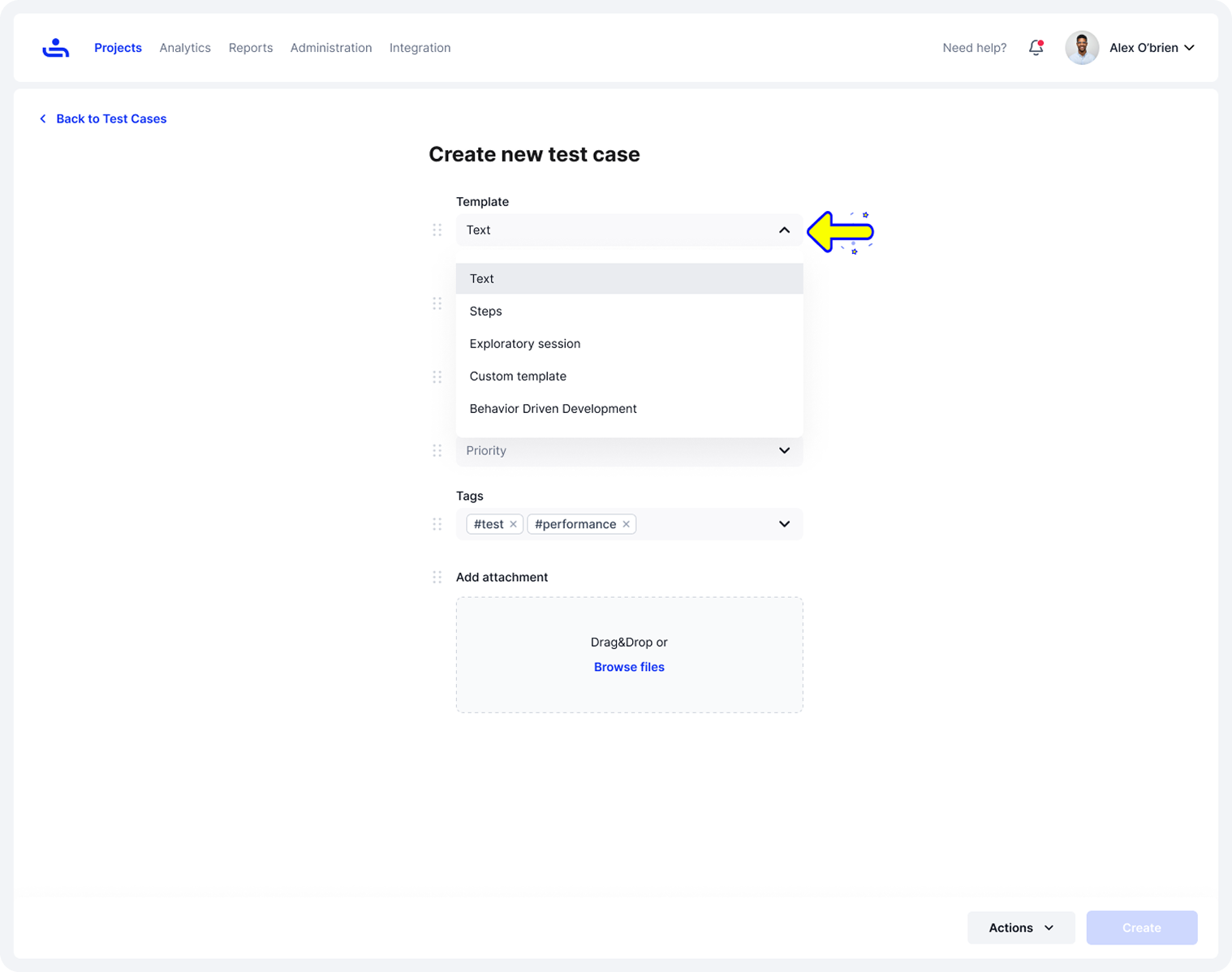
In the first step, you choose a template to start with. Templates are pre-built test case formats that give you a ready-made structure, so you don’t have to start from scratch.
Once the template is selected, you can fill in the details, name, folder, priority, tags, and any attachments. Attachments can include screenshots, design mockups, API contracts, sample data files, or requirement documents that give testers the context they need to run the test accurately.
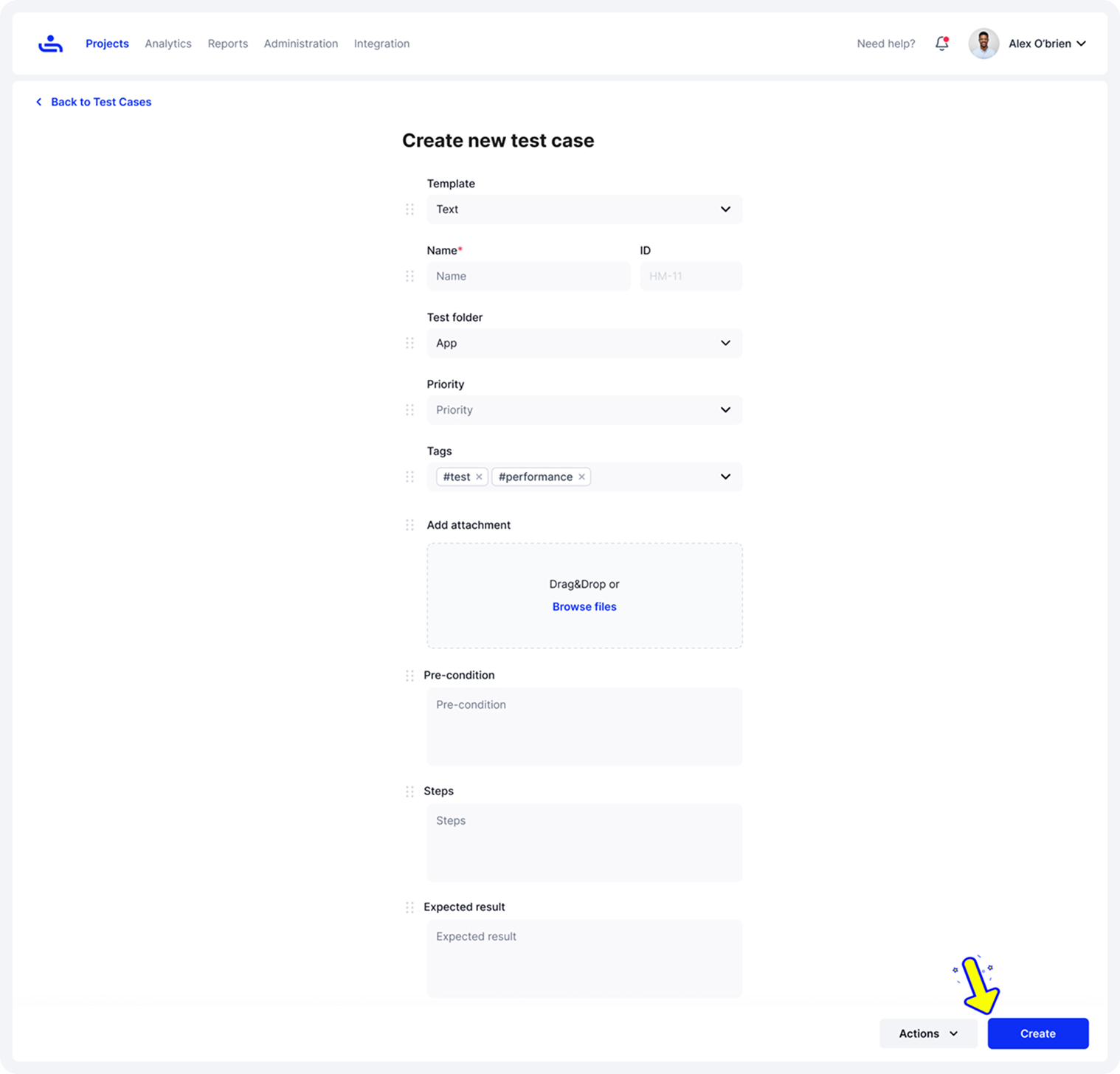
After that, you move on to adding the key details, preconditions, expected results, steps, and any other information needed for the test. Everything is laid out clearly, so completing the form only takes a moment.
Once you hit Create, the new test case appears in your Once you hit Create, the new test case appears in your test case repository, along with a confirmation message. This repository is where all your test cases live, making it easy to browse, filter, and manage them as your suite grows. The process stays consistent whether you’re adding one test or building out an entire collection.
Best Practices for Writing Effective Test Cases
Writing test cases might seem routine for experts, but it’s what keeps QA organized and dependable. A well-written case greatly saves time and reduces confusion, which means you can put more effort into other things that require brainpower.
Use simple, precise language: Keep your test cases clear and straightforward so anyone on the QA team can follow them without confusion. Avoid jargon and focus on clarity to make execution faster and more accurate.
Keep test cases independent: Each test should be able to run on its own without depending on the results of another.
Focus on one objective per test: Make sure every test case checks a single function or behavior. This helps identify problems quickly and keeps debugging simple when a test fails.
Regularly review and update: As the software changes, review and update your test cases so they still reflect current functionality
Reuse and modularize where possible: If multiple tests share similar steps, create reusable components or templates. This saves time, promotes consistency, and makes updates easier in the long run. TestFiesta also supports Shared Steps, allowing you to define common actions once and reuse them across any number of test cases. This saves time, promotes consistency, and makes updates easier in the long run.
Common Mistakes to Avoid When Writing Test Cases
Even experienced QA teams can make small mistakes that lead to unclear or incomplete test coverage. Here are some common pitfalls to watch out for:
Ambiguous steps: Writing unclear or vague instructions makes it hard for testers to follow the test correctly. Each step should be specific, action-based, and easy to understand. Example: “Check the login page” is vague. Instead, use “Enter a valid email and password, then click Login.”
Missing preconditions: Skipping necessary setup details can cause confusion and inconsistent results. Always list the environment, data, or conditions required before running the test. For example, forgetting to mention that a test user must already exist or that the tester needs to be logged in before starting.
Combining multiple objectives: Testing too many things in one case makes it difficult to identify what went wrong when a test fails. Keep each test focused on a single goal or function. For instance, a single test that covers login, updating a profile, and logging out should be split into separate tests.
Ignoring edge and negative cases: It’s easy to focus on the happy path and miss out on negative scenarios. Testing edge cases helps catch hidden bugs and makes your software reliable in all situations. Example: Not testing invalid input, empty fields, extremely large values, or actions performed with a poor internet connection.
Using TestFiesta to Write Test Cases
Creating and maintaining test cases can often be time-consuming, but TestFiesta is designed to make the process easier and more efficient than other platforms. TestFiesta helps QA teams save time, stay organized, and focus on actual testing instead of repetitive setup or documentation work.
AI-Powered Test Case Creation: TestFiesta’s on-demand AI helps generate test cases automatically based on a short prompt or requirement. It minimizes manual effort and speeds up preparation, giving testers more time to focus on execution and analysis.
Shared Steps to Eliminate Duplication: Common steps, such as logging in or navigating to a page, can be created once and reused across dozens of test cases. Any updates made to a shared step reflect everywhere it’s used, helping maintain consistency and save hours of editing.
Flexible Organization With Tags and Custom Fields: TestFiesta lets QA teams organize test cases in a flexible way. You can use folders and custom fields for structure, while flexible tags make it easy to categorize, filter, and report on test cases dynamically. This tagging system gives you far more control and visibility than the rigid folder setups used in most other tools.
Detailed Customization and Attachments: Testers can attach files, add sample data, or include custom fields in each test case to keep all relevant details in one place. This makes every test clear, complete, and ready to execute.
Smooth, End-To-End Workflow: TestFiesta keeps every step streamlined and fast. You move from creation to execution without unnecessary clicks, giving teams a clear, efficient workflow that helps them stay focused on testing, not the tool.
Transparent, Flat-Rate Pricing: It’s just $10 per user per month, and that includes everything. No locked features, no tiered plans, no “Pro” upgrades, and no extra charges for essentials like customer support. Unlike other tools that hide key features behind paywalls, TestFiesta gives you the full product at one simple, upfront price.
Free User Accounts: Anyone can sign up for free and access every feature individually. It’s the easiest way to experience the platform solo without friction or restrictions.
Instant, Painless Migration: You can bring your entire TestRail setup into TestFiesta in under 3 minutes. All the important pieces come with you: test cases and steps, project structure, milestones, plans and suites, execution history, custom fields, configurations, tags, categories, attachments, and even your custom defect integrations.
Intelligent Support That’s Always There: With TestFiesta, you’re never left guessing. Fiestanaut, our AI-powered co-pilot, helps with quick questions and guidance, and the support team steps in when you need a real person. Help is always within reach, so your work keeps moving.
Final Thoughts
Learning how to write a test case effectively is one of the most impactful ways to improve software quality. Clear, well-structured test cases help QA teams catch issues early, stay organized, and gain confidence in every release. Although good documentation is crucial to keep everyone on the same page, well-written test cases make testing smoother, faster, and more consistent. The time you invest in learning how to write a test case pays off through shorter testing cycles, quicker feedback, and stronger collaboration between QA and development teams. TestFiesta makes it even easier to write a test case and manage your testing process with AI-powered test case generation, shared steps, and flexible organization.
FAQs
What is test case writing?
Test case writing is the process of creating step-by-step instructions that help testers validate if a specific feature of an application works correctly. A written test case includes what needs to be tested, how to test it, and what result to expect.
How do I write test cases based on requirements?
To write test cases based on requirements, start by reading project requirements and user stories to have a better idea of what the feature needs to do. Identify main scenarios that need testing, both positive and negative ones. Write clear steps for each scenario, list any preconditions, and explain the expected result. Each test case should be mapped to a specific requirement to ensure full coverage and traceability.
How to write automation test cases?
Start by selecting test scenarios that are repetitive and time-consuming to run manually. Define clear steps, inputs, and expected results, then convert them into scripts using your chosen automation tool. Write your tests in a way that makes updates easy, avoid hard-coding values, keep steps focused on user actions (not UI details that may change), and structure them so they can be reused across similar features.
How to write a good test case?
A good test case is clear, focused, and easy to follow. It should have a defined objective, simple steps, accurate preconditions, and a clear expected result. Avoid ambiguity, keep one goal per test case, and make sure it can be repeated with the same outcome every time.
How to write a test case in manual testing?
To write a test case in manual testing, make notes that clearly explain what to test, how to test it, and what outcome is expected. Include any preconditions, such as login requirements or setup steps. Once executed, record the actual result and compare it with the expected result to determine whether the test passes or fails.